
Rock Beats
Office 365: Your email and files on the go!
Office 365 is a new technology that allows you to access your email and files on the web from anywhere, on any device. By saving your files to Microsoft OneDrive, you can open and edit those files on any computer, not just in your office.
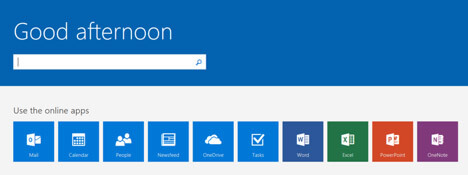
To access Office365 you can either visit office.roundroundrocktexas.gov or go to EmployeeNet and click on Office Online under Quick Links. Log in with your city email and password and you will be directed to your Office 365 Homepage.
Microsoft OneDrive
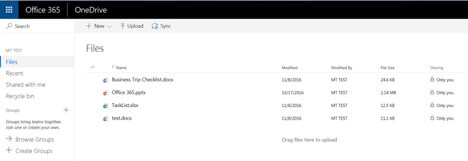
The central place to start with Office 365 is OneDrive. This is the space to store whatever files are needed. Each user has the ability to store up to 5TBs, and any type of files can be stored here, not just Office Documents. Files can be added by dragging and dropping them into the OneDrive screen.
Mobile and Online Office Apps
Collaborate with Word, Excel, PowerPoint, and OneNote from your desktop, mobile device, and the web.
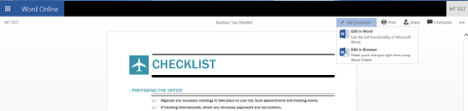
While OneDrive can store many different types of files, if the file is an Office file you can edit it right from the browser. Just open the file from OneDrive, choose edit in browser, and start to make the changes needed. Office doesn’t even need to be installed on the device you are working on.
Office 365 offers the ability to access and edit files from anywhere. Depending on the device you are on, you can choose to access files using the installed Office applications on your computer, the Office online apps that run in your browser, or the Office Apps available for download in the Apple and Android app stores.
Automatic Version History
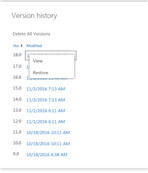 A helpful feature that Office 365 provides is Version History. This is a way to restore an older version of a file to a previous state. If a file has an issue or needs to be recovered, an older version can be restored right from OneDrive. Right click on the file that needs to be restored, click version history, choose the date that you want to restore back to, and the file will now display those changes.
File Sharing
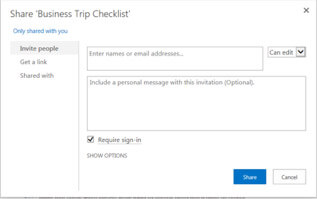 Another feature that can be used in Office365 is the ability to share files. A file can be sent to another person, inside the City or out, and allow them to make collaborative changes to the document. This allows another user to contribute and edit a file while still being stored on your OneDrive. To do this right click on the file that you want to share, click share, fill out the form with whom you would like to share with and what permissions that person should have. This can be a helpful tool to share files and work together on documents that would typically be emailed back and forth.
Office365 provides many other new features and remote file access that the City has not had in the past. This new technology could help improve current processes or facilitate new processes, depending on the needs of a department. If you would like any additional information or training call the helpdesk at 512-218-3211.